EMC Tools Addon
Installation instructions

All primitives in my addon are parametric. You can adjust all of their values after the creation process at any time from the side panel. Since they're being generated via modifiers, you can share your file with anyone without worrying about compatibility

The smooth faces operator found in the face select mode context menu is more accurate to the subD modifier than the default subdivide smooth operation. However, it doesn't smooth the same, and does not support creases

the Patch Fill operator found in the EMC tools menu attempts to create a patch with the first matching pattern in the pattern order found in the redo panel. Original geometry must not be floating edges

The Retopo operator will use the optional PolyQuilt addon if installed, otherwise it will use the Poly Build tool included in blender. In this example it's using PolyQuilt. Origin of the retopo mesh is based on selection.

most of the radial modifiers in the modifiers menu are modal. Some provide different default settings based on selection.
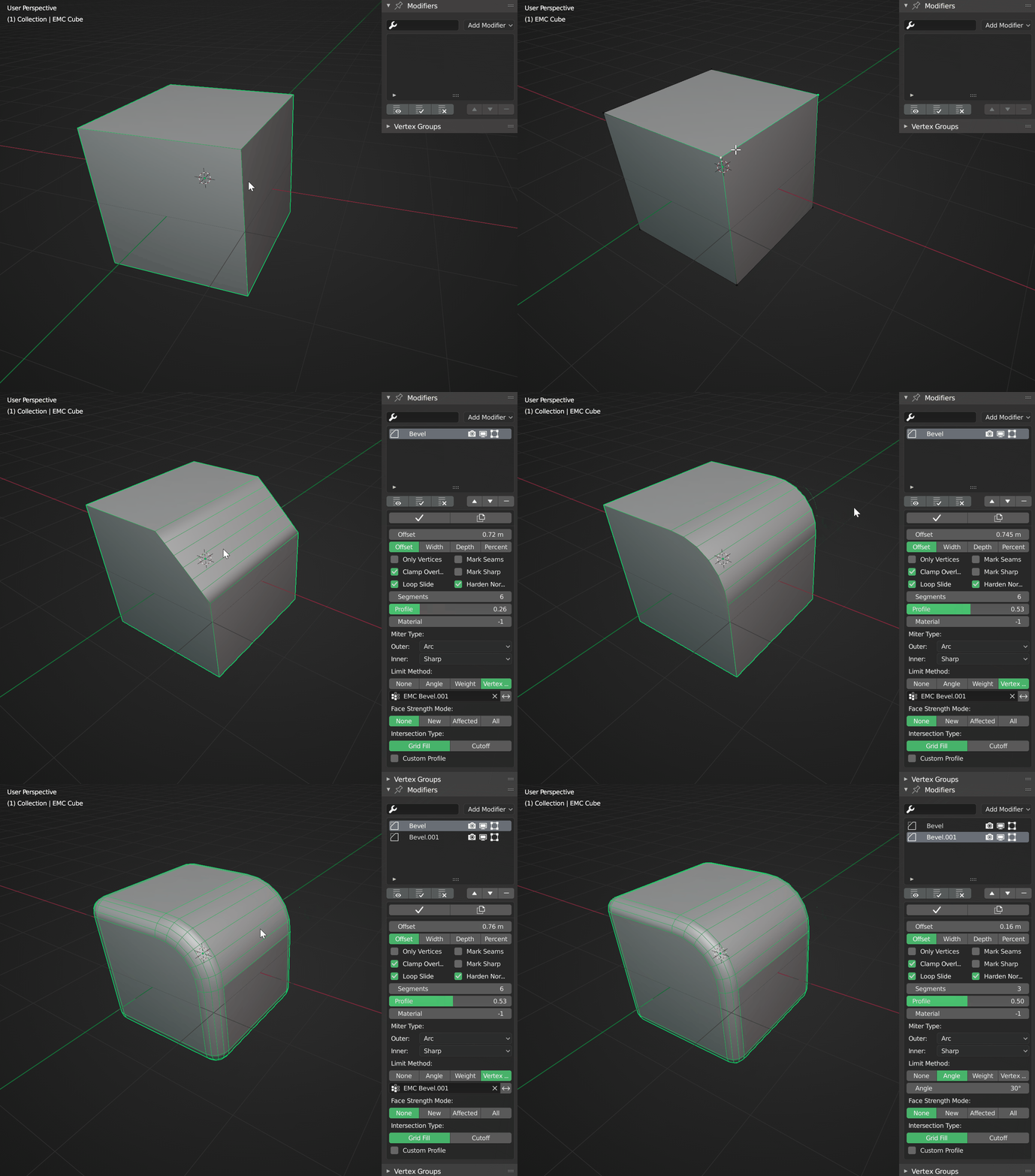
The bevel modal will bevel only selected vertices in edit mode using vertex groups, while using angle in object mode.

NEW IN VERSION 1.2.2! as of Blender version 2.91, this addon's booleans use collections instead of objects

This operator creates a bake cage from an instance of the selected model. Thickness is adjustable via weight painting and by the displacement modifier's sliders

Interactive sharpening by angle. I encourage you to explore the smoothing sub-menus in both object mode and edge select mode!

Create face maps from islands. This operator doesn't always work on first try (Haven't figured out why yet). BEWARE that face maps CAN NOT share faces unlike vertex groups

Sharpen boundary edges of face maps. This could be useful in conjunction with the previous operator mentioned.

"Hole Edge Loop" is a weird name, I know. But that's exactly what it does
it creates an edge loop around a selected concave open edge selection. This example is a comparison between blender's Offset Edge Loop and my operator

Repeat will repeat the code written in the field the number of times specified. If more than one step is needed, you can use a text file like shown here. Code can be copied from the info editor or by hovering over a button and pressing Ctrl+C

The Toggle SubD operator toggles all Subdivision Surface modifiers available on all selected objects (mapped to Ctrl+Shift+V by default)
Video showing the process of creating a simple model using only modifiers via my addon
EMC Tools Addon
I decided to learn a little bit of python to make my life easier in the long run, by creating an addon that either combines certain functions into one or by performing certain actions to achieve an effect that I frequently use. I also created menus that resemble maya menus in order to get used to those menus, should I have the need to switch applications.
------------------------------------
In this post, I'll be showing certain general features that I think need explaining. If something isn't show, I'm assuming it's easy enough to figure out on your own
------------------------------------
I am aware that some blender users don't like using pie menus at all, and this addon is almost exclusively pie menus. Fear not however! every button in this addon is a separate operator, so you can assign shortcuts to anything you can think of. The activation requirements for most of the pie menus involve moving the mouse by default, however, so if you change it to press instead, you can easily right click any button and assign shortcuts from there
------------------------------------
you can get the addon from these links:
https://github.com/ehabcharek/EMC-Tools